
AI training for your team.
First lesson free.
Stacks Academy is 16 short lessons on using an AI assistant at work, whatever the job. The skill is the same for everyone. The steps are the ones for the assistant your company uses: ChatGPT, Claude, Gemini, Microsoft Copilot or Grok.
74% of frontline workers use AI. Only 36% feel trained. See the research
What is in it
Lessons16, about 2.5 hours
Assistants5, you pick yours
Questions3 on every lesson
CertificateOn finishing
Paying$75 a seat, once
The first lesson needs no account and no card. The rest are for teams that have bought the course.
See all the lessonsYour team already uses AI. Few were shown how.
Use has raced ahead of training, small businesses train least, and people who were never shown how let mistakes and private data slip through.
74%
of frontline workers use AI regularly. Only 36% of workers feel sufficiently trained.
BCG, AI at Work 2026
48%
of people who use AI at work have put sensitive company or customer data into public AI tools.
KPMG and University of Melbourne, 2025
13%
of businesses with 1 to 4 employees that use AI trained their staff to use it. At 250 or more employees: 31%.
US Census Bureau, 2026
Small businesses train least
Of businesses that use AI, the share that trained their staff to use it
The most common plan at small businesses that use AI: give staff the tools and hope they learn. 48% do that, up from 41% a year before (US Chamber of Commerce, 2026).
Untrained use goes wrong
Of people who use AI at work, the share who say they have
In the course: Lesson 2, what not to paste in. Lessons 7, 9 and 10, checking what it gives you.
What it costs, and when it pays back
Move the sliders for your team. Each seat, with the paid time to take the course, is $170.35: it is earned back after about 4.5 hours of saved time.
The minutes are your estimate: no study yet measures what a short course adds on its own.
Pays for itself in about 9 weeks
- Seats, paid once
- $750
- All in, with their paid course time
- $1,704
- Time saved in a working year
- $9,410
- Year one, after the cost
- $7,707
A seat is $75, paid once. Course time is 152 minutes at $37.64 an hour, the average employer cost per hour at US businesses with 1 to 49 workers (Bureau of Labor Statistics, June 2026), which also values the time saved. A working year here is 50 weeks.
Use is racing ahead of training
Share of workers, 2023 to 2026
Training and support get people using it
Workers who have used AI chatbots at work, by what their employer offers
In the course: a free lesson for managers, bringing AI to your team.
It saves real time on the right work
Less time to finish than a matched group without AI, in randomized studies
On a task AI gets wrong, consultants using it were 19 points less likely to get the right answer than those without it. The skill is knowing what to hand over, and when to check.
Sources and fine print
No randomized trial yet measures what a short course adds on top of having AI tools. Survey figures are what people report about themselves. Some sources sell AI tools or consulting: Microsoft and GitHub, Google, BCG, and KPMG, which part-funded its study. The Danish study has not found effects on pay or hours so far.
- BCG, AI at Work 2026
- BCG, AI at Work 2025
- KPMG and University of Melbourne, Trust, attitudes and use of AI, 2025
- US Census Bureau, Business Trends and Outlook Survey, AI supplement, 2026
- US Chamber of Commerce, Empowering Small Business, 2026
- Humlum and Vestergaard, NBER working paper 33777, 2026
- Peng et al., 2023 (Microsoft Research and GitHub)
- Noy and Zhang, MIT, 2023
- Dell'Acqua et al., Harvard Business School with BCG, 2023
- Paradis et al., Google, 2024
- Dell'Acqua et al., Procter & Gamble, NBER working paper 33641, 2025
- METR, 2025
- US Bureau of Labor Statistics, Employer Costs for Employee Compensation, June 2026, table 6
See what your team gets.
Ten-minute lessons with the steps for your assistant, questions that show it stuck, and a view of who has finished. These are the course's own pages; the people in them are examples.

Lesson 1 is free
What these assistants are, and where they go wrong. Mac presents it on video: he is an AI presenter, and everything he says is also written out in the lesson.
- 10 minutes, no account needed
- Steps for ChatGPT, Claude, Gemini, Copilot or Grok
- Ends with three questions
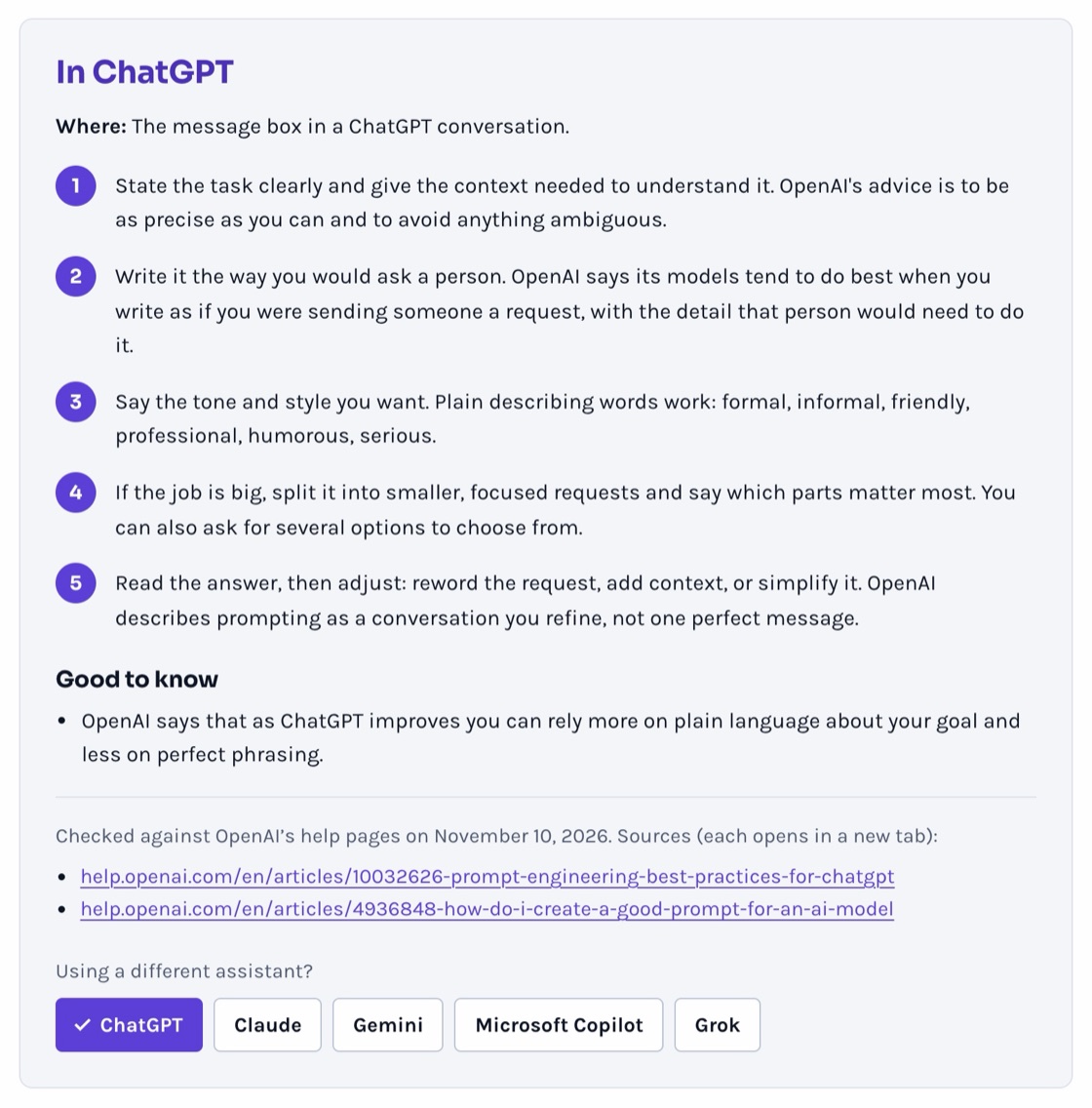
The steps for your assistant
Each lesson shows where to do it in the assistant your team uses, here ChatGPT, checked against its maker's help pages and dated.
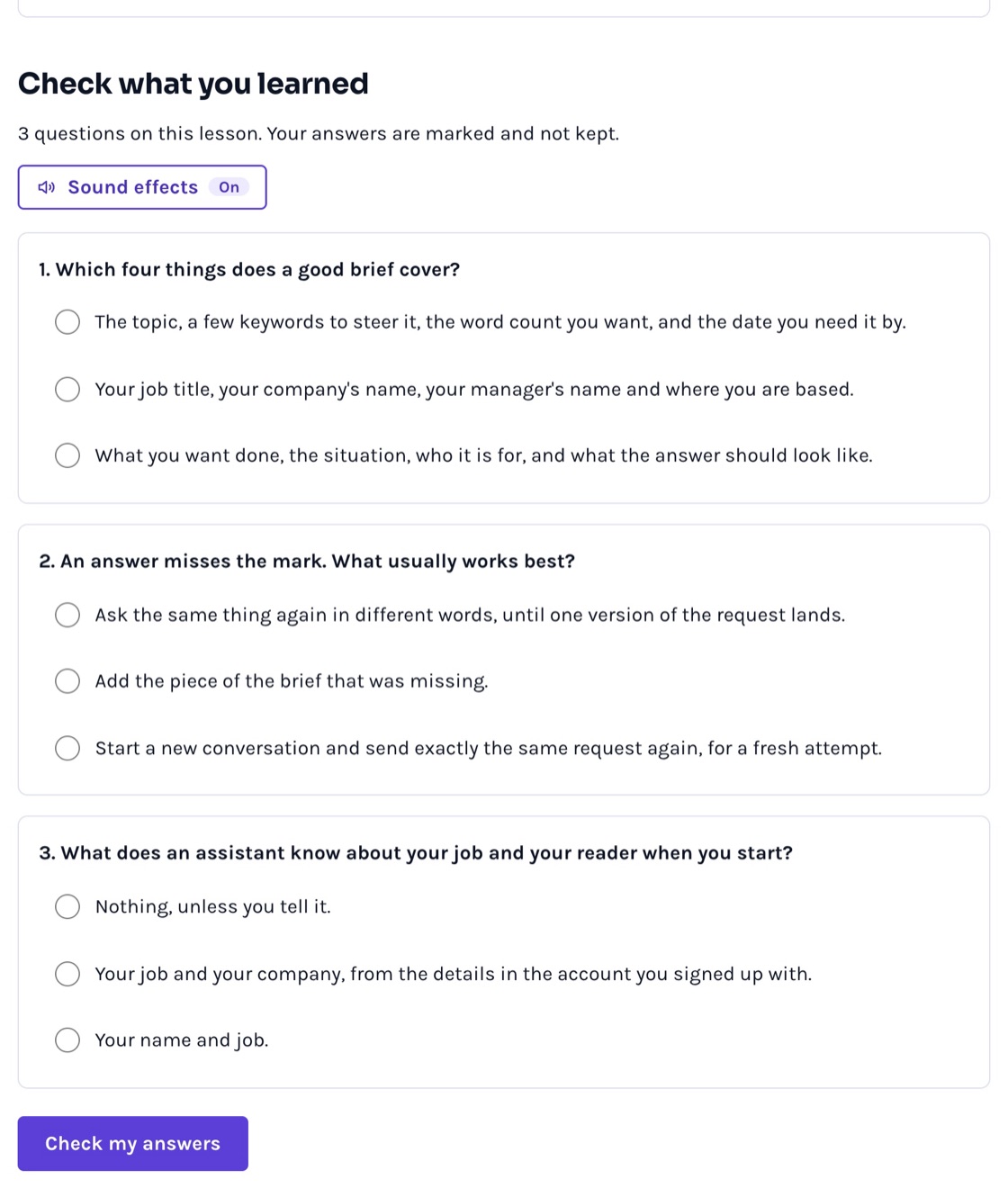
Three questions to finish
A lesson counts as finished when all three are right. The answers are marked, not kept.

See who has finished
The manager's view of the team, lesson by lesson. The names here are examples.

A certificate at the end
With a number anyone can check online. This one is an example: the name and number are made up.
One price per person, paid once.
What it costs to train a team, in money and in time, next to Coursera's plan for businesses.
A team of 10, for one year
What you pay for the training, in US dollars
Stacks Academy does not renew: the 10 seats stay paid for, and the second year costs nothing more.
Their time costs money too
Paid time for one person to finish, at $37.64 an hour
Ten minutes at a time, so nobody loses a day to training.
Side by side
Coursera's prices and course lengths are the ones coursera.org showed on November 23, 2026, in US dollars. They change, and they differ outside the US. When we checked, Coursera for Teams was on sale at $239.40 per user for the first year, renewing at its base price, and one person could buy Coursera Plus for $59 a month or $399 a year. Coursera's catalog covers every subject, not only AI. Sources: Coursera for Business, compare plans, Coursera Plus, Generative AI for Everyone, 6 hours, Introduction to Microsoft Copilot, 7 hours.
The steps for your assistant
Pick the assistant you use once, and each lesson shows where to do it there. The steps come from that assistant's own help pages, carry the date they were checked, and are checked again as the menus change.
Whatever the job
Every lesson has an example, something to try on your own work, and ideas for people at a desk, with customers, on site, or running a team.
Questions, then a certificate
Each lesson ends with 3 questions, and a lesson counts as finished when they are right. Finish all 16 and there is a certificate to download, with a number anyone can check.
Safe before clever
The course covers what not to paste in, how to check an answer before you use it, and when not to use an assistant at all.
A manager sees who finished
Your team joins with a code. A manager sees who has finished which lesson and on which day, and can set the assistant the whole company uses. Nothing anyone types in a lesson is kept.
Mac, an AI presenter
Mac presents the first lesson on video, and gives short video tours of ChatGPT, Claude and Grok. He is AI-made, and every page that shows him says so. Everything he covers is also written out.
Lessons 1 to 8
- 1. What these assistants are, and where they go wrong
- 2. What not to paste in
- 3. Tell it who you are and what you need
- 4. Show it an example
- 5. Keep going: fix the answer instead of starting over
- 6. Draft and edit writing in your own voice
- 7. Summarize a long document or a meeting, and check the summary
- 8. Work with a file: documents, PDFs and spreadsheets
Lessons 9 to 16
- 9. Tables and numbers: ask for analysis you can check
- 10. Look something up with sources, and verify them
- 11. Save your setup
- 12. Skills: teach it a job once
- 13. Pick the right model for the job
- 14. Connect it to your files, email and calendar
- 15. Agents: hand over a whole job, and stay in charge
- 16. When not to use it
Lesson 1 is free: What these assistants are, and where they go wrong. There is also a free optional lesson for managers: bring AI to your team, one job at a time. And an optional lesson on automating a routine job, so it runs on a schedule. Where an assistant's maker does not document a step, that lesson shows the general version for it.
Why not let staff figure it out themselves?
Most small businesses do: 48% of those that use AI give staff the tools and hope they learn (US Chamber of Commerce, 2026). But people who were never shown how get caught out: 66% of people who use AI at work say they have relied on its answer without checking it, and 48% have put sensitive company or customer data into public AI tools (KPMG and University of Melbourne, 2025). The course teaches what to hand over, how to check the answer, and what never to paste in.
Which AI assistants does it cover?
ChatGPT, Claude, Gemini, Microsoft Copilot or Grok. Each person picks the one they use, or a manager sets it for the whole team, and every lesson then shows the steps for that one.
Do we need to be technical?
No. The lessons are written in plain words for people in any job: at a desk, with customers, on site, or running a team.
How long does it take?
Each lesson takes 8 to 12 minutes, and the 16 of them come to about 2.5 hours. There is no schedule: people do a lesson when they have ten minutes.
Is there a certificate?
Yes. Someone who finishes every lesson can download a certificate with a number anyone can check. It is a record of finishing the course, not an accredited qualification.
Can we see a lesson before we decide?
Yes. The first lesson is free and needs no account.
How does a team get it?
Buy a seat for each person at academy.smallstacks.net/buy: $75 a seat, paid once, with no subscription and a 7-day money-back guarantee. Your team is ready as soon as you have paid, with the code your staff join with. Questions first? Write to hello@smallstacks.net.
Can we add people later?
Yes. The team's manager can buy more seats at academy.smallstacks.net/buy at any time, at $75 each, and the new people join the same team.
Is anything we type kept?
No. Nothing anyone types in a lesson is kept, and the answers to a lesson's questions are marked, not kept. The course keeps each person's name, their team, and which lessons they finished and when, so a manager can see it and a certificate can be made.
Try a lesson. Then bring the team.
The first lesson takes 10 minutes. If it is useful, buy a seat for each person and your team is ready as soon as you have paid. The same people can also have an AI agent built for one job.
- First lesson free
- 5 assistants covered
- A certificate on finishing
- Paid once, no subscription
- 7-day money-back guarantee